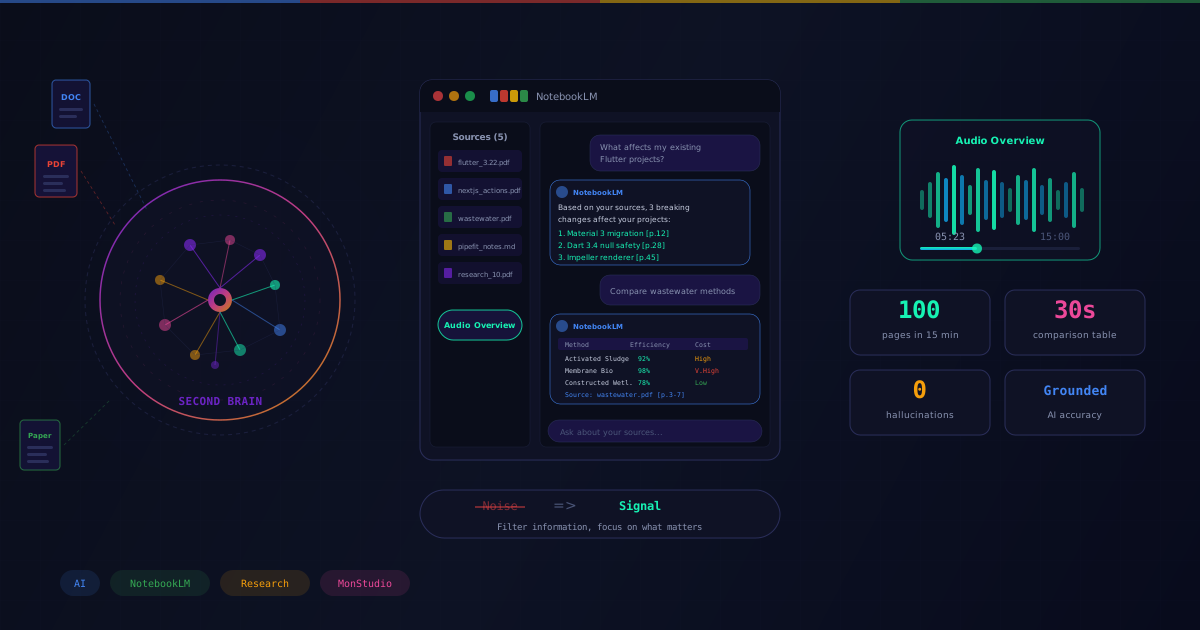
Turning NotebookLM Into My "Second Brain": How I Read 100 Pages of Docs in 15 Minutes
How Google helps me balance Coding, Scientific Research and Product Building
What do you do when you have 5 technical PDF files, 3 lengthy scientific papers, and only 1 hour to understand all of them?
Before, I would brew a strong cup of coffee and mentally prepare to grind through the night. But since discovering Google's NotebookLM, my entire research workflow at MonStudio (and my studies in Taiwan) has completely changed.
Today, I want to share how this tool helps a "One-Man Army" like me process massive amounts of information without getting overwhelmed.
1. What is NotebookLM? (And why is it different from ChatGPT?)
"Why not just dump everything into ChatGPT?" — Many people ask me this. The problem with ChatGPT is Hallucination. It draws knowledge from the entire Internet, so sometimes the answers are generic or flat-out wrong.
NotebookLM is different. It's a Grounded AI. It only answers based on exactly the documents you feed it (PDFs, Google Docs, Slides...). If the information isn't in the documents, it simply says "I don't know".
This is crucial for someone in Engineering and Scientific Research like me. Accuracy is priority number one.
2. Audio Overview: Turning Boring Docs into Podcasts
This is the killer feature. Imagine I have a 50-page document about Next.js 15 Server Actions. Reading it makes my eyes glaze over.
I upload the PDF to NotebookLM, hit "Generate Audio". Boom! 3 minutes later, I have a 15-minute Podcast-style conversation between two AI experts (one male, one female). They discuss the document content enthusiastically, explain complex concepts in plain language, and even crack jokes!
I put on my headphones and listen while jogging (or doing dishes). Knowledge seeps into my brain passively without the effort of reading.
3. Real-World Use Cases at MonStudio
I use NotebookLM for 3 main purposes:
- Learning new tech: When Flutter drops a new update, I feed it all the Release Notes. Then I ask: "Is there anything that affects my existing projects?". It instantly pinpoints the code sections that need changes.
- Scientific Research (At Yuan Pei University): I feed it 10 papers on "Wastewater Treatment". I command: "Summarize the common methods and compare their effectiveness". It produces a comparison table in 30 seconds. Saves weeks of reading.
- Writing App Documentation: I feed it my messy notes from coding PipeFit Pro, then tell it: "Rewrite this as an end-user guide". The result is incredibly polished.
4. Conclusion
In the AI era, the smartest person isn't the one who knows the most, but the one who can search and synthesize information the fastest.
NotebookLM doesn't think for me. It helps me filter out Noise so I can focus on the Signal. It's a tireless research assistant that I don't have to pay a salary.
If you're drowning in documents, give it a try. You'll feel twice as smart — I promise.

Manh Hung — Founder @ MonStudio
Product Builder & Mobile Engineer
Got an idea you want to bring to life?
Get in touch with MonStudio to turn your idea into a real product.
Get in Touch